

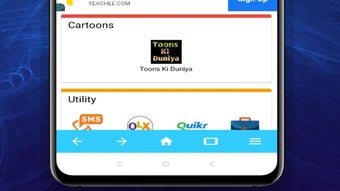
Description
Download Web Browser Beta Pro Fastest B APK – web browser, fast private safe web browse, browse securely, online activities, incognito tabs, media player, high-quality videos, multiple tabs, bookmark favorite sites, desktop mode, most visited websites, watch cartoons, watch shows, streaming videos, browser for Android, secure browsing, free browser, PC software, desktop application
Overview
Web Browser Beta Pro-Fastest B is a free-to-use desktop application designed for Android devices, offering a straightforward browsing experience with core web navigation features. The software enables users to engage in a variety of online activities, including research, social media interaction, and content consumption. Its primary purpose is to deliver high-speed browsing while incorporating privacy-focused tools such as incognito tabs, allowing users to browse without saving local data. The application is intended for individuals seeking a basic yet functional browser with minimal setup and no cost. It supports multiple tabs, bookmarking favorite sites, and viewing webpages in desktop mode for enhanced compatibility with certain websites. A distinctive feature is the built-in media player, which allows users to watch videos, cartoons, and shows directly within the browser without switching to external apps. While the software is positioned as a secure and private browsing tool, the developer did not provide additional details about data handling or security protocols. Real-world usage scenarios include quick access to frequently visited sites, private browsing sessions, and on-the-go video viewing. The application’s lightweight size of 15.6 MB suggests it is optimized for devices with limited storage, though exact performance characteristics were not specified.Key Features & Capabilities
- High-Speed Browsing – The browser is designed to facilitate fast loading of web pages, aiming to reduce wait times during navigation. This is particularly beneficial for users who prioritize efficiency when accessing online content.
- Incognito Mode with Private Browsing – Users can open incognito tabs to prevent the browser from recording history, cookies, or site data. This feature is ideal for sensitive tasks such as online banking or private research.
- Built-In Media Player – A unique capability allows direct playback of videos, including shows and cartoons, without requiring external media applications. This integration streamlines the viewing experience for users who consume video content frequently.
- Multiple Tab Support – The software enables users to open and manage multiple web pages simultaneously, improving multitasking efficiency during research or content consumption.
- Bookmarking and Quick Access – Users can save favorite websites for easy retrieval. The homepage displays a list of most visited sites, enabling one-click navigation to frequently used destinations.
- Desktop Mode Viewing – This feature adjusts the display to mimic a desktop browser, improving compatibility with websites that are optimized for larger screens and more complex layouts.
User Interface, Workflow & Performance
The user interface of Web Browser Beta Pro-Fastest B is described as outdated and less intuitive compared to modern alternatives like Google Chrome or Firefox. Navigation relies on standard browser controls, but users may encounter delayed responses when interacting with certain buttons, which can disrupt workflow efficiency. The layout appears minimal, with a focus on core functions, but lacks the visual polish and responsive design elements found in leading browsers. The homepage displays a list of most visited websites, which can enhance accessibility for frequent users. However, the absence of customizable themes or advanced layout options may limit user satisfaction over time. Performance observations are based on general software behavior patterns, as specific metrics such as CPU or RAM usage were not provided. The developer did not specify resource usage details, so users should expect typical behavior for lightweight Android applications. While the browser performs adequately for standard web tasks, users have reported instances of buffering during video streaming, suggesting potential limitations in handling high-bandwidth content. Stability during extended use remains unclear, as no information was shared about crash rates or memory leaks.Compatibility & System Requirements
Web Browser Beta Pro-Fastest B is designed for Android devices and is available in version 2.1.3. The application has a file size of 15.6 MB, indicating a lightweight footprint suitable for devices with constrained storage. It is compatible with Android operating systems, though the specific version range was not listed. The developer did not provide detailed system requirements, including minimum RAM, processor specifications, or storage capacity. As such, compatibility information is limited to the platform and version already stated. Installation is straightforward, and the app is distributed as an APK file, which is typical for Android software. Users should ensure their device supports APK installations, as this may require enabling "Unknown Sources" in security settings. The software does not appear to require a specific hardware configuration beyond standard Android device capabilities. Exact performance details were not specified, so users should rely on general expectations for Android applications of similar size and category.Pros and Cons
Pros
- Free to use with no in-app purchases or hidden fees.
- Lightweight size (15.6 MB) ideal for devices with limited storage.
- Supports multiple tabs for improved multitasking.
- Includes a built-in media player for watching videos without switching apps.
- Offers incognito mode for private browsing sessions.
- Displays most visited websites on the homepage for quick access.
Cons
- Outdated user interface that lacks modern design elements.
- Delayed response times reported when interacting with interface elements.
- Video streaming may experience buffering, affecting playback quality.
- Missing detailed system requirements and performance data.
- Not optimized for high-bandwidth video content.
- Interface may be difficult to navigate for new or casual users.
FAQ Section
Is Web Browser Beta Pro-Fastest B compatible with my Android device?
The software is designed for Android and is available in version 2.1.3. However, the exact minimum Android version required was not specified. Users should ensure their device supports APK installations.
Is the browser safe to use for private browsing?
The app includes incognito tabs, which prevent local data from being recorded. However, the developer did not provide details about encryption, data tracking, or security protocols. Users should exercise caution when entering sensitive information.
Does the browser support updates?
Version 2.1.3 is the latest release as of the provided information. No details were shared about the update frequency or automatic update capabilities.
What type of license does the browser use?
Web Browser Beta Pro-Fastest B is offered as a free software application with no cost for use. The license type was not specified beyond this.
Can I use the browser offline?
The browser requires an internet connection to load web pages and stream content. While cached pages may be accessible offline, the application does not support full offline functionality.
Final Thoughts + CTA
Web Browser Beta Pro-Fastest B delivers a basic yet functional browsing experience tailored for Android users seeking a free, lightweight browser with a built-in media player. While it excels in core functionalities such as multiple tabs, bookmarking, and incognito browsing, its outdated interface and inconsistent video playback performance hinder its overall appeal. The app is best suited for users who prioritize cost and simplicity over modern design and high-performance streaming. For those needing a reliable, fast, and visually appealing browser with strong video capabilities, alternative options may be more appropriate. Despite its limitations, it remains a viable choice for casual browsing and basic online tasks. Download Web Browser Beta Pro Fastest B APK now to experience a free browser with unique media integration and secure browsing features.Guides & Tutorials for Web Browser Beta Pro Fastest B APK
How to install Web Browser Beta Pro Fastest B APK
- Click the Preview / Download button above.
- Once redirected, accept the terms and click Install.
- Wait for the Web Browser Beta Pro Fastest B APK download to finish on your device.
How to use Web Browser Beta Pro Fastest B APK
This software is primarily used for its core features described above. Open the app after installation to explore its capabilities.
User Reviews for Web Browser Beta Pro Fastest B APK 0
No reviews found





